Move to Posify O2O — Buy 2 years, get 1 years free, plus 25% off. Switch now.

Posify O2O New Retail Cloud Platform
  • Product
    • Retail POS + Store + O2O All-in-One
    • F & B Fast Orders, Dine-in & Takeaway
    • Beauty Booking, Members & Staff Scheduling
  • Features
    POS Solution
    • Mobile POS Mobile POS for Selling Anywhere
    • Self Checkout Kiosk Self-Checkout, Less Staff Needed
    • iPad POS Fast Touchscreen Checkout
    • Multi-store POS Multi-Store Sync in Real Time
    • POS Hardware Complete POS Hardware Kit
    Smart Operations Platform
    • Referral Benefit Referral Rewards for Shopping
    • Product Bulk Listing & Inventory Tags
    • CRM Points, Stored Value & Tiered Membership
    • Orders Unified Online & Offline Orders
    • E-Gift Card Custom Gift Cards to Drive Repeat Purchases
    • Reporting Live Sales & Profit Insights
    • Inventory Multi-Warehouse Stock Alerts
    • Merchant App View Business Performance Anytime on Mobile
    • Digital Marketing Integrated Social Marketing and Event Tracking
    • SEO SEO Boost & Organic Traffic
    • Promotion Coupons & Promotions
    • Payments Octopus, WeChat Pay, Alipay & Cards
  • Pricing
    Retail
    • Online Shop Online Store & Orders
    • ePOS POS + Kiosk with Inventory
    • O2O POS + Store + Membership
    F & B
    • F & B Dine-in, Takeaway & QR Ordering
  • Resources
    Resources
    • Showcase
    • Solution
    • Blog
    • Announcement
    • About Us
    Industry Tips
    • Apparel & Fashion
    • Pet Supplies
    • Glasses & Color Contacts
    • Frozen Food
    • Cosmetics & Supplements
    • Fitness Equipments
    • Stationery & Groceries
    Partner
    • Eco-Partner / Third-Party Integration
    • Referral Program
  • Help Center
    • Retail POS, eCommerce and CRM guides
    • F & B POS, ordering and delivery guides
    • Service Booking, POS and CRM guides
Hong Kong
  • Taiwan
  • Singapore
  • Australia
English
  • 繁體中文
Sign-in
Try Now
English
  • 繁體中文
Try Now Sign-in

Please fill in all fields

By creating your account you agree to the Master Agreement and Privacy Policy & receive the latest news from Ubeing.

Forgot password One-tme password
Try Now
Knowledge and help centre /FnB POS /FnB POS(v9.0) /Kitchen POS New user Guide /Order records
繁體中文 / English
Back to all topics
FnB POS
  • FnB POS(v9.0)

    • Kitchen POS New user Guide

      • POS system installation and login
      • Basic Settings
      • POS Order food
      • Scan code to order food
      • Order food remotely
      • Kitchen prepares meals
      • Order records
    • Kitchen POS system Settings

      • Select a store
      • Select the business mode
      • Select remote ordering
      • Enables and sets the payment function
      • Sets up the dining area
      • Language Settings
      • Other charges/discounts
      • Sets the POS currency and tax rate
      • Search function
      • Menu display
      • self-service ordering home page design
      • Logo Settings
    • FnB product management

      • Catering Department
      • Add-ons
    • printer connection and setup
    • KitchenPOS Dine-in Order

      • POS堂食點餐-先用餐,後付款(有座號)
      • POS堂食點餐-先付款,服務員送餐(有座號)
      • KitchenPOS order processing
      • KitchenPOS payment operation
    • Scan codes to order food

      • Table code (order first, pay later)
      • Table code (pay first)
      • Store code (pay first)
    • Kitchen POS-Remote_ordering
    • KitchenPOS KDS
    • Membership Management
    • Financial Statement
    • Cash register management

      • Cash register operation
  • FnB POS(v8.0)

    • F&B Product Management
    • Scan code ordering process
    • Catering screen display order number page
  • Posify KDS

    • Posify KDS installation and login
    • mode selection
    • System configuration
    • Kitchen order made

      • Same-day order browsing
      • Order reminder markers
      • Same-day order making
      • Browse by appointment order
      • Orders are made on the same day
    • package processing
    • orders delivered
    • order management
    • call number

Order records

Some or all of this tutorial is currently available in Traditional Chinese. The original steps and screenshots are shown below. View the Traditional Chinese version.

On this page
  • 查询交易記錄
查询交易記錄

查询交易記錄

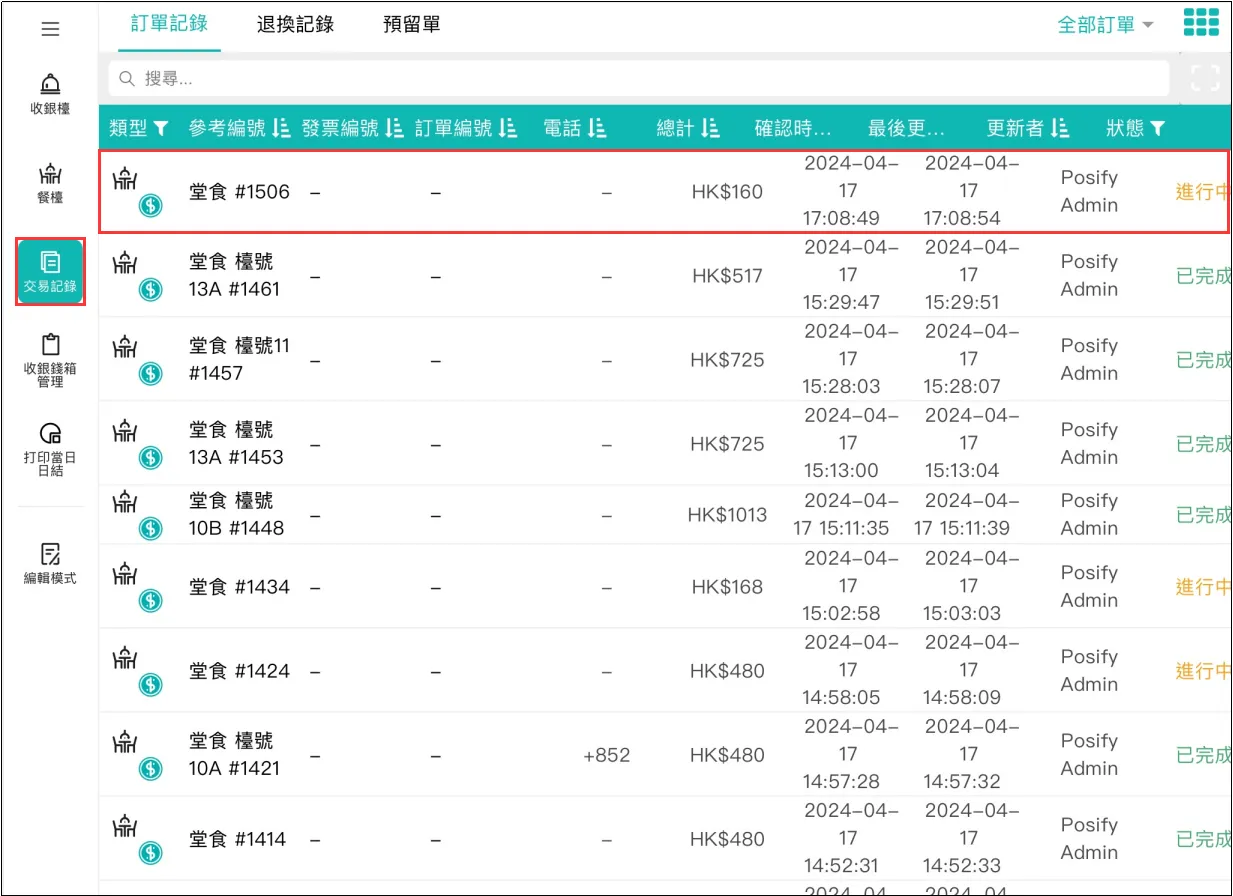
打開POS點擊交易記錄點擊訂單記錄,便可查看到最近完成的訂單。同時,也能看到其他狀態的訂單,包括正在進行中的訂單和待取貨的訂單等。

View all topics and tutorials

Posify

+852 5939 1716

ENQUIRY@POSIFY.ME

17th Floor,Silvercord Tower 2,
30 Canton Road,Kowloon Hong Kong.


Solution

Online Shop

ePOS

O2O

Branded App

Self-checkout Kiosk


Product

Retail

F&B

Beauty

Features

CRM

Product

Inventory

Orders

Payments

Reporting

Promotion

SEO

Digital Marketing

Merchant App

E-Gift Card

Mobile POS

Referral Benefit

Posify

About Us

Blog

Eco-Partner /

Third-Party Integration

Referral Program

Hardware

Consultation


Stay Connected 

  • Taipei Office
  • Zhuhai Office

Taipei Office


No. 99, Fuxing North Road

15F, Songshan District

Taipei City 105, Taiwan


Tel: (852) 5938 1716

Email: enquiry@posify.me

Zhuhai Office


Tangjiawan Town, High-Tech Zone

Block C, 2/F, Building 24, Kechuang Park

No. 1 Gangwan Road, Zhuhai, China

We serve cookies.

We use tools, such as cookies, to enable essential services and functionality on our site and to collect data on how visitors interact with our site, products, services. By clicking Accept, you agree to our use of these tools for advertising, analytics and support.

  • Posify   ® Copyright 2026.
  • Master Agreement
  • Privacy Policy
Posify
Posify
If you are interested in our products or have any questions, feel free to contact us.
Hello, what product would you like to inquire about?
Start Chat
Pick a date & time
Build to Order
Info

Registration completed successfully!

Your would be redirect to checkout process in few seconds...

Your would be redirect to member area in few seconds...


Forgot your password?
Or
Re-pay Order

Your expected date and time has been expired. Please input again.

Customer Contact
Send one time password through SMS

Mobile no.*

Please enter the one time password

Migrate the contact information to profile?

Migrate the contact information to profile?

Information Supplement
Bundle Product
Select product(s) from Selected 0/

View By: |

Confirm
Please select the channel to receive verification code.
Confirm
...
Info
...
Login
Arrival notice
Email Verification

Verification Code has sent you through Email. Please enter Verification Code below: